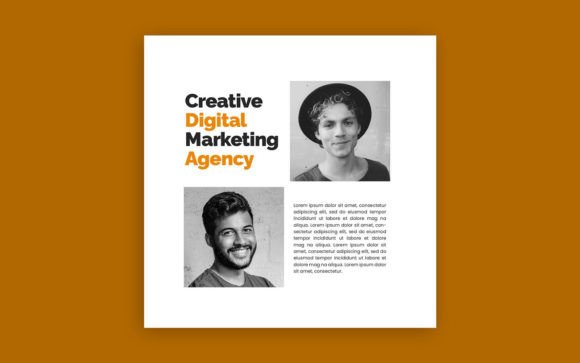
Marketing Agency Social Media Post Template Guide
Let's be honest: maintaining a consistent, professional social media presence is a massive time sink for any marketing agency or small business. You need to post regularly to stay relevant, but constantly creating graphics from scratch is exhausting. This is where having a solid design template system changes the game. Instead of reinventing the wheel every time you open Photoshop, you start with a foundation that already works. The Marketing Agency Social Media Post template is exactly that kind of foundation—a clean, structured starting point designed for real-world marketing needs.
This isn't about some overly artistic, hard-to-read font choice. The template uses Poppins for body text, which is a geometric sans serif font known for its excellent readability across screens. Paired with Tondu Beta for headlines, which brings a bit more character and visual weight, you get a clear hierarchy right out of the box. Tondu Beta has that modern, slightly condensed feel that works well for grabbing attention in a fast-scrolling feed without looking cheap or overly trendy. It’s a practical font pairing that balances personality with clarity, something crucial for social media graphics where you have maybe two seconds to make an impression.
Designed for Real Workflow, Not Just Aesthetics
The real value of a template like this isn't just how it looks, but how it works. The files are set up at 1080x1080 pixels at 300 DPI, which is the standard square format for platforms like Instagram and Facebook. The RGB color mode ensures colors look correct on screen, which is vital for digital work. But the key feature is the organization: grouped and sequenced layers. If you have basic Photoshop skills—enough to change text, swap a photo, and adjust a color—you can customize this entire template in minutes. Every element is on its own layer, logically named and grouped. This saves you from digging through a chaotic layers panel, which is a common frustration with poorly made design assets.
Think about your brand identity. Consistency is what builds recognition. Using a template ensures your posts have a uniform look—the same spacing, the same text alignment, the same color palette application. This consistency signals professionalism. When a potential client sees your feed, they don't just see random posts; they see a cohesive brand identity that appears organized and trustworthy. That perception is powerful for a marketing agency trying to attract clients who value attention to detail.
Where This Template Truly Shines
This particular style of template—clean, modern, with a strong typographic backbone—is incredibly versatile. It’s perfect for:
- Agency Self-Promotion: Showcasing case studies, team highlights, service announcements, or client testimonials. The structured layout makes complex information digestible.
- Client Social Media Management: If you manage social media for clients, having a customizable template system speeds up content production for multiple brands. You can adapt the base design to different color schemes and fonts as needed.
- Small Business Owners & Entrepreneurs: For those running their own social media, it removes the design guesswork. You can focus on your message and content strategy, knowing the visual execution is handled.
- Content Creators & Bloggers: Promoting blog posts, YouTube videos, or podcast episodes with clean, professional-looking graphics that encourage clicks.
The visual personality is decidedly modern and corporate-friendly, but not sterile. The choice of Tondu Beta adds a touch of creative flair that prevents it from looking like a generic corporate template. It’s suitable for industries like tech, consulting, real estate, professional services, and e-commerce. The modern typography avoids overly decorative scripts or handwritten fonts that might clash with a serious brand identity, making it a safe yet stylish choice for commercial use.
Practical Tips for Using the Template
Getting the most out of this template involves a few smart practices:
- Test Your Brand Colors: Before you start editing, define your brand's primary and secondary colors. Use the template’s color-coded layers to apply them consistently. Check the contrast between text and background colors for accessibility—light text on a dark background or vice versa generally works best for readability.
- Respect the Hierarchy: The template is designed with a visual flow. Tondu Beta is for headlines and key takeaways. Poppins is for supporting text and details. Don’t undermine this by making everything the same size or weight. This hierarchy guides the viewer’s eye exactly where you want it.
- Choose Quality Photos: The template will look mediocre with poor, low-resolution images. Use high-quality, relevant photos that align with your message. Ensure the photos are well-composed and not too busy, as they need to work within the template’s framed areas.
- Customize Thoughtfully: Change the text, swap images, and adjust colors, but think twice before altering the core layout drastically. The spacing and alignment are intentional for visual hierarchy and balance. Small tweaks are fine; completely restructuring it might break the design’s effectiveness.
Remember, a template is a tool to enhance your efficiency and consistency, not a crutch that eliminates creativity. Use it to handle the repetitive aspects of production so you can spend more time on strategy, copywriting, and engaging with your audience. That’s where the real marketing work happens. The Marketing Agency Social Media Post template gives you a professional, editable foundation to build upon, ensuring your social presence looks polished and intentional without consuming your entire day.
If you decide to use this template, pay attention to how it streamlines your process. Does it save you time? Does it make your feed look more cohesive? Those are the practical markers of a good design asset. And if you have thoughts on the template itself—the fonts, the layout, the editability—feedback is always valuable for creators refining their offerings. The goal is to make tools that genuinely help people do better work, faster.