Professional Certificate Designs: 10 Print-Ready Templates
When you need to acknowledge an achievement, completion, or excellence, the physical document matters just as much as the sentiment behind it. A flimsy, poorly formatted certificate can undermine the hard work it represents. That is why having access to high-quality Professional Certificate Designs is not just a luxury; it is a necessity for maintaining high standards in any organization. This collection provides a robust solution for designers, entrepreneurs, and small business owners who need reliable, customizable templates that look impressive right out of the box.
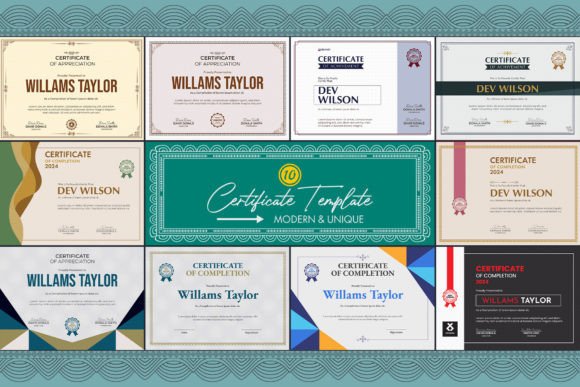
Unlike generic Word document templates, these files are engineered for high-end results. The package includes 10 different designs, ensuring that you have the variety needed for different types of recognition—from academic completion to employee of the month or workshop participation. The visual personality of these templates strikes a balance between classic authority and modern cleanliness. They utilize structured layouts that guide the eye naturally from the recipient's name to the description of the achievement, ensuring that the content hierarchy is always respected. Whether you are a graphic designer looking for a time-saving asset or a business owner creating internal awards, these templates offer the versatility required for professional environments.
Technical Precision: Print-Ready and Scalable
One of the biggest pain points in design is the transition from screen to print. How many times have you designed a document only to find the colors washed out or the edges cut off? This collection of Professional Certificate Designs eliminates those headaches with industry-standard specifications. Each file is set up at US Letter Page size (11.25 x 8.75 inch) and optimized at 300 DPI. This resolution is critical for print-ready assets, ensuring that text appears crisp and gradients remain smooth on paper.
Furthermore, these templates include bleedings. For the uninitiated, a bleed is the area outside the boundary of the final document size that gets trimmed off after printing. Including this in the design ensures that your background colors or patterns extend all the way to the edge, preventing any unprinted white margins. Because the files are delivered in Adobe Illustrator (Eps) format, they are fully vector-based. This means you can scale elements infinitely without losing quality. If you decide to print these certificates on larger poster boards or scale them down for digital badges, the integrity of the design remains intact.
Total Customization and Brand Consistency
A certificate should not feel generic; it should feel like an extension of the organization presenting it. This is where the true value of these Professional Certificate Designs shines. The templates are editable in any font and color. This level of control is vital for maintaining brand identity. If your company uses specific corporate colors or a proprietary serif font for headers, you can easily swap out the existing design elements to match your style guide.
The package also addresses a common logistical hurdle: fonts. There is nothing worse than opening a file and seeing "Font Missing" errors. To solve this, the free fonts used in the designs are included via a link in the main file. This ensures that the visual consistency is maintained from the moment you open the file. You can adjust the typography to suit the tone of the event. For a formal academic award, you might stick with a classic serif typeface. For a creative workshop or a modern startup, you could swap the text for a clean sans serif font or even a subtle script font for the recipient's name to add a touch of elegance.
Practical Applications for Creatives and Businesses
The versatility of these templates makes them an essential part of any design assets library. They are not limited to just corporate use. Here is how different audiences can leverage these files:
- Entrepreneurs and Small Business Owners: Use these templates to create loyalty awards for customers or completion certificates for online courses. It adds a layer of professionalism that builds trust with your audience.
- Marketers and Content Creators: If you run a community or a membership site, digital certificates are excellent engagement tools. You can edit these templates to create "Top Contributor" badges or webinar attendance proof.
- Designers and Publishers: These serve as excellent starting points for editorial design projects or client work. Instead of building a layout from scratch, you can focus on the creative details, knowing the structure is sound.
The "cool and smooth" aesthetic of the multipurpose templates ensures they fit into modern environments. They avoid overly ornate borders that can look dated, favoring clean lines and ample white space. This makes them ideal for web design mockups as well; you can easily adapt the layout for a digital PDF delivery without it looking cluttered on a screen.
Finalizing Your Design Workflow
Working with Adobe Illustrator allows for a professional workflow. You can lock layers, adjust vector points, and manage typography with precision that raster-based editors cannot match. When you are ready to print, remember to export the file correctly with the bleed marks included to ensure your print shop can process the job without delays.
Ultimately, a certificate is a symbol of value. By utilizing these Professional Certificate Designs, you ensure that the physical representation of your appreciation matches the effort put in by the recipient. It is a tool that bridges the gap between a simple thank you and a tangible memento of success.